
How to Do X for Agents?
2026-11-24
by Uri Walevski
Want this agent engine live in your WhatsApp — 1-on-1 or in group chats?
Try MentatWhenever someone wants an AI agent to handle a new workflow—send invoices, book appointments, monitor group chats, manage inventory—the same question comes up: how do you actually make X work for agents?
People often jump straight to fragile browser macros, custom glue servers, or overcomplicated harnesses. Usually the answer is much simpler. You can figure out the right approach in three yes-or-no questions.
The Decision Tree
Start at the top and stop as soon as you reach an action:
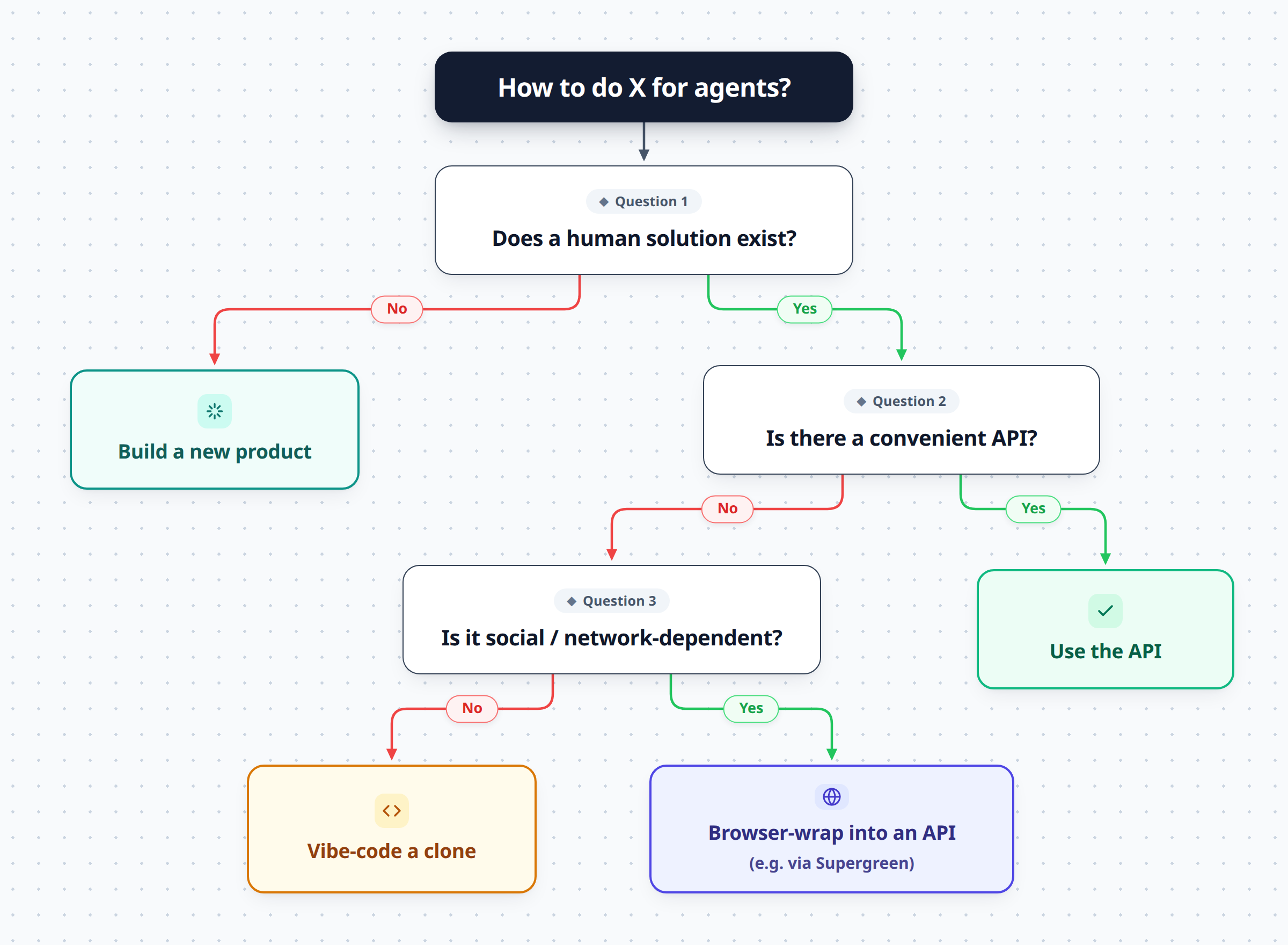
- Does a solution for humans already exist?
- No -> Build a new product.
- Yes -> Go to question 2.
- Does it have a convenient API?
- Yes -> Use it directly.
- No -> Go to question 3.
- Is it a social platform?
- No -> Clone or rebuild it with vibe coding so it has a clean API.
- Yes -> Use a browser and wrap it into an API.
Each branch leads to a different kind of engineering work.
1. No Human Solution Exists -> Build a New Product
If humans do not even have a solid tool for X yet, there is nothing to wrap or integrate. You are not building an agent adapter; you are building the product itself.
Design it API-first from day one so both humans and agents can work with the same underlying data without awkward translation layers. For example, AgentDocs and AgentMail exist because traditional document editors and email providers were not built around agent identities and shared human-agent workflows.
2. It Exists and Has a Convenient API -> Use It Directly
This is the easiest case, and the main rule is not to overcomplicate it.
If Stripe, GitHub, Google Calendar, or Shopify already exposes a clean REST or GraphQL API, give your agent a thin, sandboxed wrapper around that API and move on. Do not put a headless browser in front of software that already gives you JSON endpoints, and do not rebuild tools that already work well.
With
@uri/safescript
on prompt2bot, calling a clean REST API takes a short typed function with
explicit host and secret boundaries—no extra server or browser required.
3. No Convenient API, Not a Social Platform -> Rebuild It With Vibe Coding
This is the branch most teams get wrong.
Suppose there is an internal tool, a legacy SaaS dashboard, a niche CRM, or a booking portal built strictly for humans clicking through forms in a browser. It has no API, or its API is locked behind enterprise contracts and painful approval hoops.
Before coding agents, your only option was automating the UI with Playwright or Selenium and fixing broken selectors every time the vendor shipped a redesign.
That tradeoff has shifted. For non-social software—trackers, back-office panels, CRMs, intake forms, scheduling tools—the core logic is mostly straightforward CRUD plus a handful of business rules. Instead of maintaining a brittle browser script that pretends to click buttons on someone else's UI, it is often faster and far more reliable to clone or rebuild the tool with vibe coding and give it a clean API from the start.
Once you own the data model and endpoints, your agent stops scraping HTML and starts reading and writing structured data.
4. No Convenient API, and It Is a Social Platform -> Browser + API Wrapper (Supergreen)
You cannot vibe-code your way out of a social network.
WhatsApp, Telegram, Facebook, Instagram, and LinkedIn exist because everyone is already on them. You can build a cleaner messaging app in an afternoon, and it will not matter because your customers, team chats, and leads are already inside those networks.
At the same time, social platforms rarely offer clean programmatic access. Official APIs either do not cover personal accounts and group chats, require months of business verification and rigid message templates, or block the everyday workflows people actually rely on.
In this branch, you have to run real browser or client sessions under the hood and wrap them into an API.
You do not need to build and babysit that browser infrastructure yourself. Supergreen is built specifically to solve this "social with no API" case by turning social channels into a clean REST API and webhooks for agents:
- WhatsApp (personal numbers, 1:1 chats, and groups without Meta Business API template friction)
- Telegram
- Facebook (including group reading and posting)
- Virtual phone numbers
Each channel runs in an isolated session with its own proxy and exposes simple HTTP endpoints and incoming webhooks. Your agent talks to Supergreen like any other REST service, while Supergreen handles the browser and protocol plumbing underneath. (We also covered how this fits into the broader agent stack and passive group monitoring.)
Keep It Simple
Next time you need to make X work for an agent, run through the three questions before writing any code:
- If no human solution exists, build a new product.
- If it already has a convenient API, use it directly.
- If it has no API and is not social, rebuild it with vibe coding so it has a clean API.
- If it has no API and is a social platform, wrap a browser session into an API—or use Supergreen to get REST endpoints and webhooks out of the box.